This guide is for people that wish to either help automate core Items, or automate their Homebrew content.
¶ Introduction
To automate all the unique effects of moves, abilities, perks etc. we have in Foundry, we make use of their ActiveEffect System, alongside its associated Changes, those already familiar with these concepts will find however that we have greatly expanded on the core Foundry capabilities. Similarly, those familiar with how automation using Rule Elements was done in PTR1e or the source it was derrived from—the Pathfinder 2nd Edition System for Foundry—will also enjoy great familiarity.
Nonetheless, you may be reading this for the first time and have absolutely no idea what I've been yapping about, so lets quickly walk you through and explain the basic concepts.
ActiveEffects are effects that can be applied on an Actor (character) or an Item (such as an Ability, Move, etc.), you as a user may be familiar with some of them as you can apply a good chunk from the right click Token Menu, such as Paralysis or Burn.
There are 2 types of effects:
- Passives: Effects that shouldn't expire and don't have timing based effects, such as an 'End of Turn' effect.
- Afflictions: Effects that expire, and otherwise have timing based effects, like tick damage from the 'Burn' condition.
Effects can have 0 or more Changes associated with them, these changes are our modular framework for defining effects, such as applying an Accuracy Bonus, or Damage Modifier on certain rolls.
This guide will consist of a couple of parts:
- Intro & Terms
- Basic Change information & Examples
- Refferences & Option details
- 'API' documentation of all the (hidden) and more technical options that are possible
We assume that most of you reading this will not be familiar with coding, and therefore keep things simple in the first few parts, however the deeper down you go, the more in-depth the information will get, for those that wish to go the extra mile and perform in-depth automations.
Either way, you can always ask for help in the appropriate channels on the Discord!
¶ Terms
- Actor: An Actor is a type of Character within FoundryVTT, whenever we refer to actors we're talking about your PCs and NPCs.
- Item: An Item is anything from a Move, to a Perk, to an actual piece of Equipment in Foundry. Items can be hosted on Actors by dragging them onto an Actor's Sheet. Things like what Moves you know, Perks you've bought, or Equipment you have in your inventory can be tracked in this way.
- (Active) Effect: An Effect is a piece of automation that is hosted on either the Actor itself, such as the 'Frozen' Affliction, or can be hosted on an Item, generally defining the effects that come from said Item.
- Effect Item: In Foundry, Active Effects can only exist within an Actor or Item, thus to create new Effects that are not necessarily associated with any specific Actor or Item, we have added the 'Effect' Item Type, which, whenever dragged on-top of any other Item or Actor, transfers any Active Effect it may have, instead of applying itself.
- Change (Model): A Change is a single piece of automation which are held on an Effect, there can be as many Changes as needed applied to any given Effect.
- Selectors: Selectors, sometimes also known as 'Domains', are definitions for when a certain Effect needs to apply itself, which is present on most Changes. For example, the selector
attack, makes sure that an effect only is applied when making an Attack, similarly afire-attackselector will only work if the Attack action made has the Fire Type. Selectors are all written inkebab-casestyle words (all lower-case, separated by hyphens). - Roll Options: Roll options or options, are very similar to Selectors, it defines the current state of an Actor and its associated Items & Effects, this can be used to further narrow down when an effect should be applied, lets say you have an effect that makes your Fire Attacks deal more damage to Rock Type users, you would use a
fire-attackselector and then further narrow it down with a Roll Option oftarget:trait:rockso that the bonus only applies to Rock Types. Roll options are always in the format ofkebab-casestyle words (all lower-case, separated by hyphens) where the individual words are separated by colons. - Predicate: A Predicate is a series of logic based (by default) AND operations which using Roll Options help to narrow down when an effect should activate or not.
- Data Inspector: The Data Inspector is a tool we have in Foundry that allows you to inspect Actors, Items, Effects and even Rolls in Chat! Here you can see all the modifiers applied to a roll, as well as its associated Selectors & Roll Options. You can access it from the drop-down of the Actor/Item/Effect sheet, or by right clicking a Chat Message with an appropriate Roll.
¶ Change Model in Depth
A Change Model or Change is a series of instructions written in JavaScript Object Notation (JSON), which can then be applied to an Item. When that Item is then added to an Actor it will modify the Actor's data in some way, shape or form. It's an easy way of creating automation without requiring to code it!
Where possible, we have created UI so you don't even have to write this 'JSON' yourself, and instead just with a series of input fields & dropdowns can create your own automations, pretty much anyone can do it. Changes & Effects are the prefered way to add automation where possible, as it does not require any hard-coding in the system and can be re-used easily by anyone. Despite the fact that JSON sounds hard and may look a little intimidating at first glance, it's a lot easier and more flexible than writing macros.
¶ Basic Changes & Examples
¶ My First Change (Get +1 Atk Stage for 5 Activations)
We'll start off with a Simple example. This effect requires two thigns:
- It needs to apply 1 Atk stage to the Actor
- It needs to automatically expire after 5 Activations
Lets start off with the expiration, since that is handled by the type of Active Effect.
Step one is to create a new Effect Item, an Item of type 'Effect', in Foundry. After that, we go to the 'Effects' tab of that Item and here we can click the Plus button to create a new Effect.
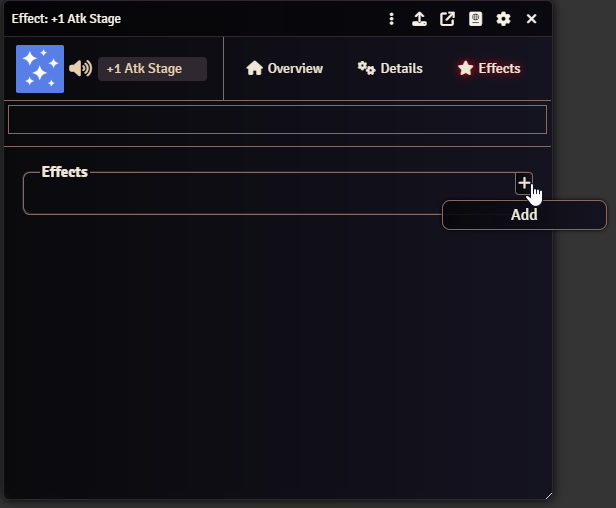
A Dialog will open up asking you for the Name & type of Active Effect, in this case since we want an Effect that automatically expires, we will want to use the 'Affliction' type. Fill in an appropriate name, and click Create.
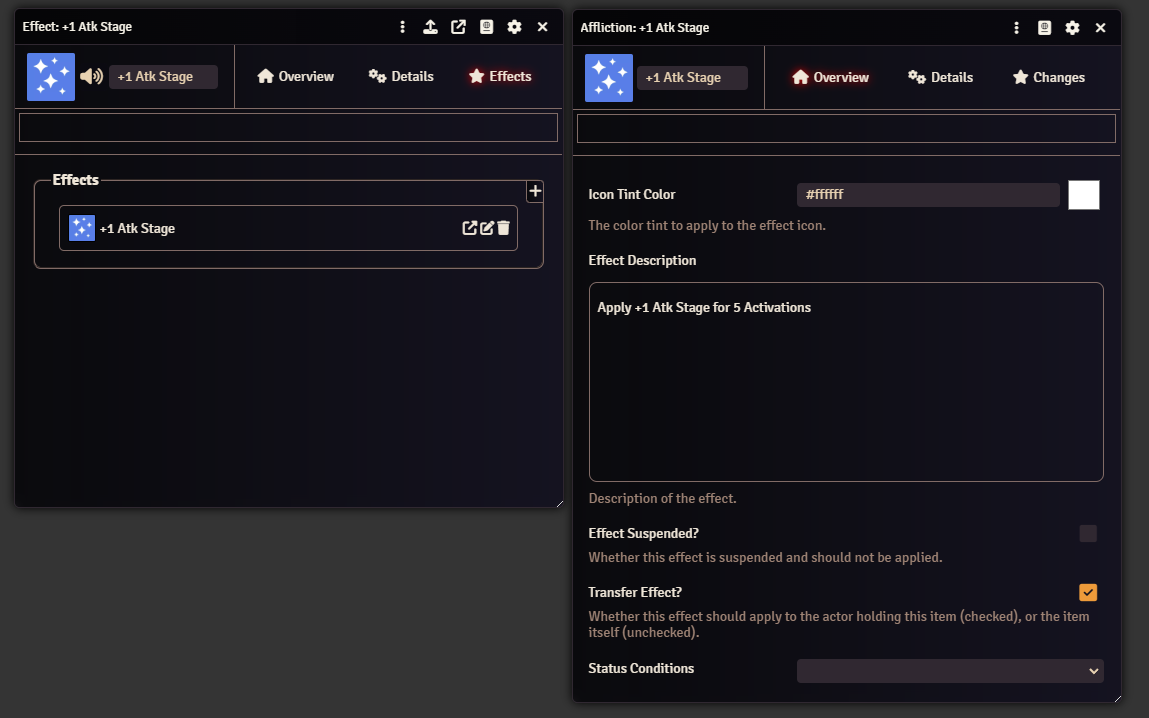
I've given the effect a quick description, but now onto the actual Automation.
The duration can be set from the 'Details' tab's top input field 'Affl. Duration', which we set to 5. The remainder we can leave as their default, as we move onto the 'Changes' tab for the +1 Atk Stage Automation!
Over on the Changes tab, you start off with clicking 'Create Change', by default this adds a new change of type 'AE-Like' which stands for 'ActiveEffect-Like', this is because it functions very similar to how the base implementation of Foundry's Active Effect system works. It allows us to change a simple value on an Actor (such as their Atk Stages).
You can change the type simply by choosing a different option in the drop down, all the info for what each option is capable of doing can be found further down in this guide, but conveniently for this example, all we need is a simple AE-Like!
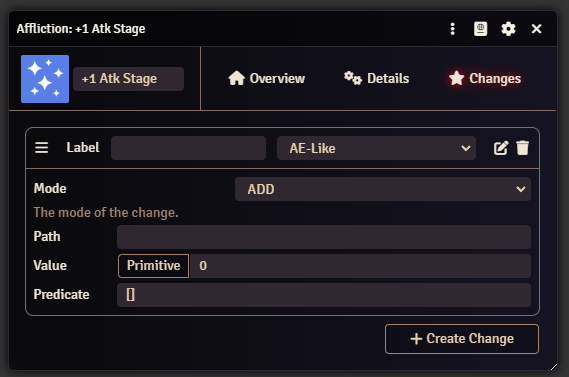
By default the Mode will be on 'Add', well conveniently we want to increase by +1 Atk Stage, so we don't have to change anything here.
Up next is the 'Path' field, this is where we define what value we want to change. The path in this case being a dot separated text describing the location on the Actor's data to edit. We'll cover how to find what this path is down below, but for this one it's quite simple, the value is system.attributes.atk.stage.
system.is the starting location where a system, such as PTR, can define its data for an Actor/Item within Foundry, you'll basically always be starting with this portion.attributes.is where all the stat information is stored, the next available options arehp,atk,def,spa,spdandspe.atk.stageis then of course the value we're looking for.
Up next the 'Value' field is another simple one, we change the default 0 to a 1.
Finally the 'Predicate' field, this field as described in the 'terms' section above, can be used to define restrictions on when this effect should apply. In this case, we don't have any, it should just apply for its 5 turns. So we leave it as the default, an empty 'Array' [].
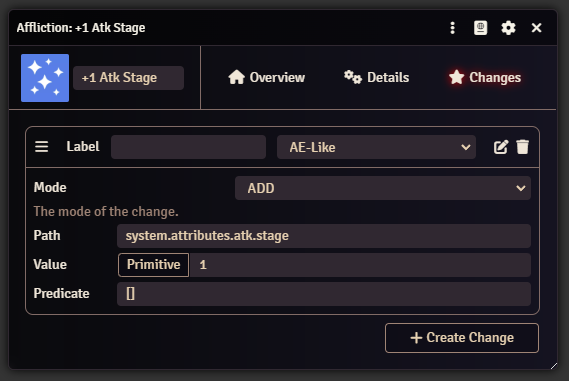
And voila! You've finished your first effect, you can now drag the Item (or its Effect) onto an Actor and see the Atk Stage on the left-end side of the Actor increase its value by 1, and it'll automatically tick down during Combat and expire after 5 of that Actor's activations.
¶ Finding the right Path & the Data Inspector
In the example above we provided the path value for you as a freebie, but you'll need to learn how to find out this info yourself as well!
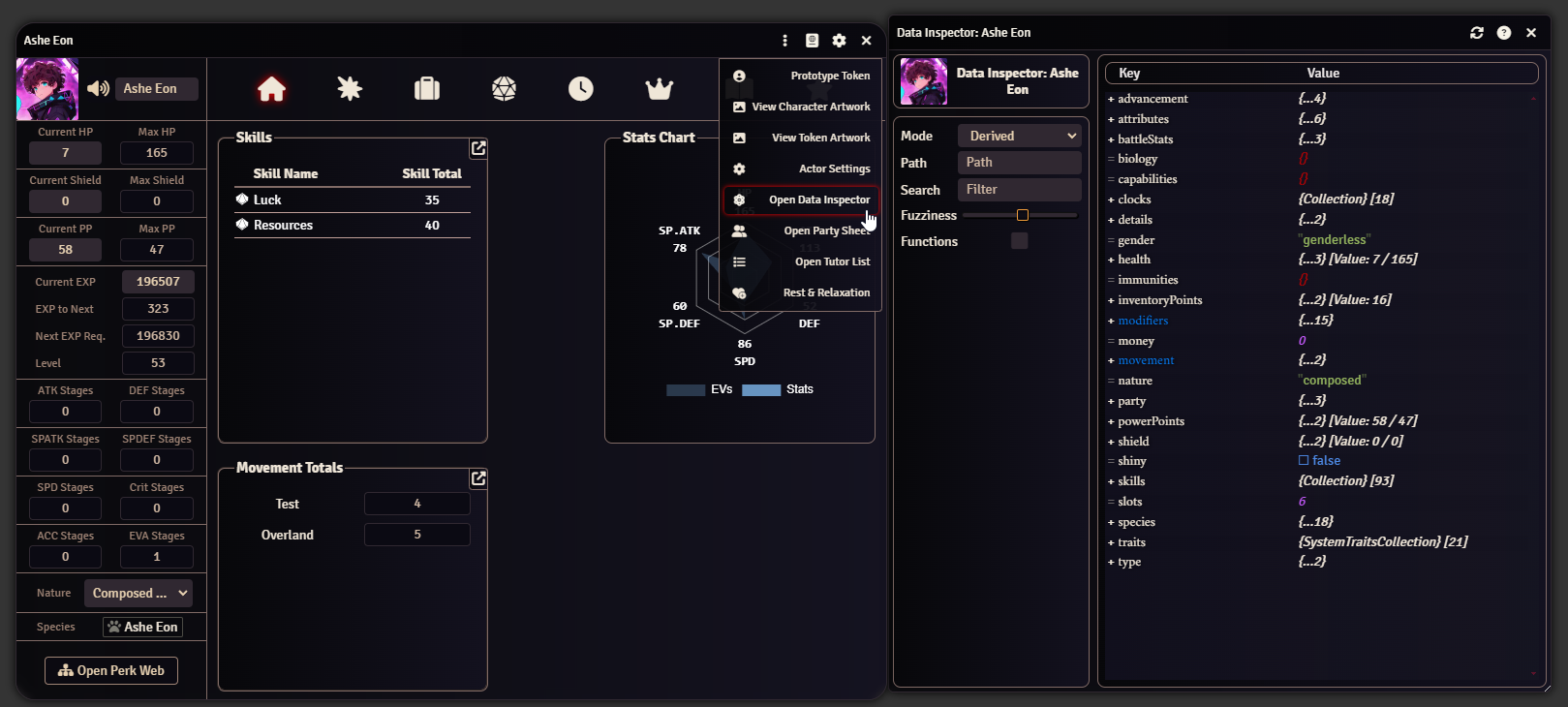
Within the Dropdown of an Actor/Item/Effect Sheet you will find the 'Open Data Inspector' option, click this and the Data Inspector will open itself up. The screen itself may look intimidating on first glance, but it really isn't that bad, lets guide you through finding that 'Atk Stage' field from earlier.
¶ Basic Controls
On the right side you can see a 'Tree View' of all the data on an actor, lets talk a little bit about the controls.
Any line with a + next to its 'Key' can be folded open to view what might be inside, meanwhile an = means that you can already see the end 'Value' on the right-end side. You can left-click any line with a + to fold it open, and similarly left-click any line with - to close it back up.
'Keys' have two colors, either White or Blue, a Blue key field means that it's a value that is calculated and not actually stored in the Data, this means that you won't be able to use it in certain Changes that would activate before that value is calculated since... well it wouldn't have been calculated yet!
Similarly, you can hover over any line to see the path, as well as it's type, value and whether it's stored in your Foundry world directly 'Source' or only available after calculations 'Derived', or both!
Finally, you can right-click on any 'Key' to copy the path that you will be using within the Change Model directly to your clipboard, right clicking the value meanwhile copies the value to your clipboard.
¶ Search
On the left hand side, you can also search through data, since we're looking for atk stages, lets see if we can find just that, lets start of by typing in 'atk'
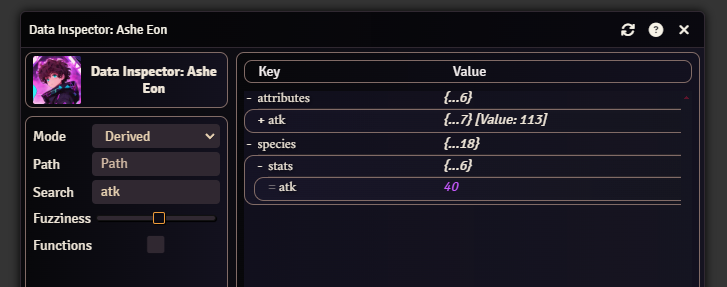
We got 2 hits here, namely attributes.atk and species.stats.atk, as we can see this Actor's base stat from their species is 40 atk, but that's not what we're looking for, we of course want the atk stage, so lets left click the 'atk' in 'attributes' to fold it open and see what's hidden inside.
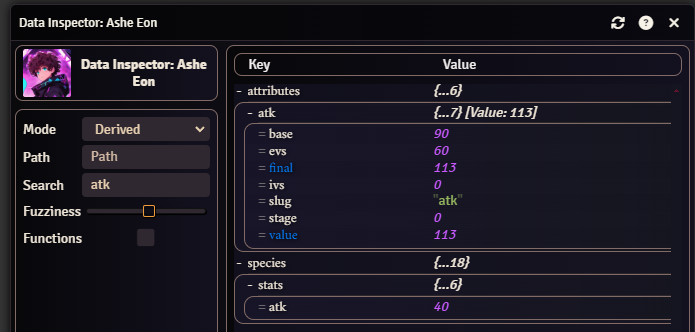
And right there, we have found it, the 'stage' field, all that's left now is to right-click the word 'stage' to copy its path and the path system.attributes.atk.stage is right there for us to paste into our change when needed.
¶ Basic Change Models
Now its time to go over all the basic change models and their fields and what values you may wish to fill in.
Every change is shown with their Visual representation as well as their JSON representation.
Some changes may have additional 'hidden' properties that are only available in the JSON editor, these are not covered in the 'Simple' section of the guide.
¶ Shared Properties
A lot of Change Models share (some of) the following properties, so lets go over them once here, so they don't need to be re-explained in every section.
label: The Label is what is shown in the Modifier Dialog that shows up before you make a roll, if left empty, it defaults to the name of the Effect itself.mode: The Mode is the type of change that should happen, generally the default is 'Add' as in Addition, to add the value onto what already exists, sometimes you may need to use 'Multiply' or even 'Override'.value: Value is well, just that, the value that should be applied. This is what is known as a 'Resolvable Value Field', which means you aren't just restricted to putting in a direct value, you could also use information based on the Actor/Item/Effect in question. For example, if you wish for the value to be equal to an Actor's current Atk Stage, you can write@actor.system.attributes.atk.stagein the value field, and it'll resolve to the correct number! Similarly, an effect that stacks could use@effect.system.stacksin its value. Finally, this field supports any Math that Foundry's chat roll command also does (minus actually rolling dice!) so if we want, say, 10% of an Actor's Max HP (rounded) we can use:round(@actor.system.health.max / 10)as the value.selector: Selectors are as described in the legend, are indicators of when a certain modifier should apply itself, detailed options can be found within the explanation of the individual changes, or can be found using the Data Inspector while inspecting a Roll.predicate: Predicates are as described in the legend, Logic Rules, that determine when something should apply.
¶ AE-Like (ActiveEffect Like)
AE-Like is the default value for a change and stands for ActiveEffect Like due to working very similar to how Core Foundry's Active Effect system works by default.
¶ Properties
labelmodepath: The Path for an AE Like is the Data Path referring to which value should be altered.valuepredicate
¶ Example - +1 Attack Stage
{
  "type": "basic",
  "key": "system.attributes.atk.stage",
  "value": 1,
  "predicate": [],
  "mode": 2
}
¶ Flat Modifier
Flat Modifiers are modifiers that apply only to specific rolls based on their selector, generally speaking a selector for Flat Modifiers is made up of 3 parts. The first part, is the basic selector as found in a Roll's Data Inspector, the second part is the 'Modifier Type' suffix such as 'accuracy', 'crit' or 'damage', which determines what about the roll is modified. The third part meanwhile is the 'Method Suffix', similar to the 'mode' property of the AE-Like selector, this says how the modifier should be applied, the values are 'percentile', 'stage' and 'flat'. An example is attack-accuracy-stage.
¶ Properties
- Label
- Selector
- Value
- Predicate
¶ Selectors
You can easily figure out what Selectors you need by making the appropriate roll in chat, right clicking it, and checking using the Data Inspector what Selectors are Available, these are some of the most common ones:
attackreferring to any attack you make{type}-attackreferring to an attack with a specific type, such asfire-attack{category}-attackreferring to an attack with a specific category,physical-attack,special-attackorstatus-attack{trait}-trait-attackreferring to an attackw ith a specific trait, such ascontact-trait-attack
Besides this, the following Modifier Type Suffixes are available:
accuracyreferrs to the Accuracy portion of the Attack Calculationevasionreferrs to the Evasion portion of the Attack Calculationcritreferrs to the Crit portion of the Attack Calculationdamagereferrs to the Damage portion of the Damage Calculationpowerreferrs to the Power portion of the Damage Calculationstatis used for modifying which stat is used to calculate the 'attacking/defending stat' portion of the Damage Calculationeffectivenessis used for modifying the effectiveness portion of the Damage Calculationcaptureis used for modifying Capture chances of Capture Rolls.
Finally, the following Method Suffixes are available:
percentileapplies as a multiplier, generally after the 'Flat' and 'Stage' modifiers are applied. Percentiles should be written full out, for example, a 10% increase would have its value written as10, a 150% decrease similarly would be written out as-150.stagecan be used to modify the stages used in the appropriate calculation, an example use here is for the 'Range Increment Penalty' the system applies.flatas the name directly adds the appropriate value as a 'flat value'.
¶ Example - +1 Accuracy Stage while Attacking with a Fire Type move
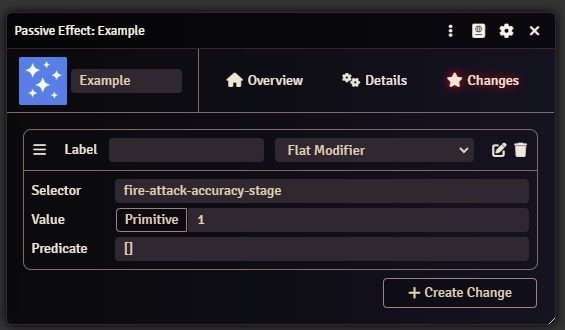
{
  "type": "flat-modifier",
  "key": "fire-attack-accuracy-stage",
  "value": 1,
  "predicate": []
}
¶ Stage & Percentile Modifier
These two are variants of Flat Modifier which already include the Method Suffix automatically. So given the Flat Modifier example, this would be the equivalent:
¶ Example - +1 Accuracy Stage while Attacking with a Fire Type move
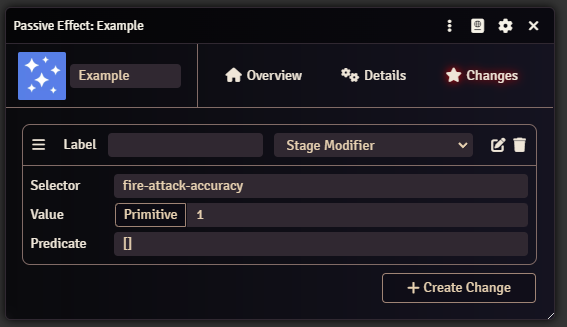
{
  "type": "stage-modifier",
  "key": "fire-attack-accuracy",
  "value": 1,
  "predicate": []
}
¶ Ephemeral Modifier
Ephemeral modifiers are another variant of Flat Modifier, however this one is applied to someone targeting you for an attack, instead of applying to a roll you make. This is useful for example if you are supposed to take less damage from certain types of attacks, like the ability Water Bubble.
¶ Example - Water Bubble's 50% Fire Damage Resistance
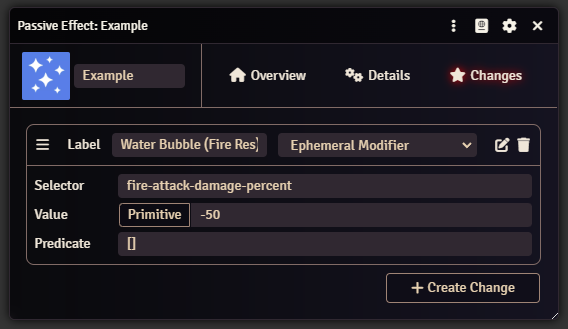
{
  "type": "ephemeral-modifier",
  "key": "fire-attack-damage-percent",
  "value": -50,
  "predicate": [],
  "label": "Water Bubble (Fire Res)",
}
¶ Grant Item
Grant Item can be used to, whenever this effect is applied, give the Actor another item. For example; an Ability with the [Connection] trait granting the appropriate connecting Move.
¶ Properties
uuid: The UUID of the item that should be granted, you can find this by clicking the 'Copy Document UUID' button at the top right of any Item Sheet.predicateallowDuplicate: Checkbox - default true, whether to allow duplicate copies of this item, or if the item already exists, to not add a new copy.reevaluateOnUpdate: Checkbox - default false, by default 'Grant Item' only applies whenever the effect is initially added to an Actor, if you turn this on every time the Actor gets updated the effect will re-evaluate if it should apply the item or not. A Predicate must be set for this function to work.replaceSelf: Checkbox - default false, when true will replace this Item/Effect with the Granted Item, instead of the default where both are added.alterations: (Complex) Alterations are effectively 'AE-Like' changes applied to the item that is granted. For example, if you are granting an item with the [Connection] keyword you could alter its action'sfreeproperty so it doesn't use up an action slot.
¶ Example - Grant the Ember Move
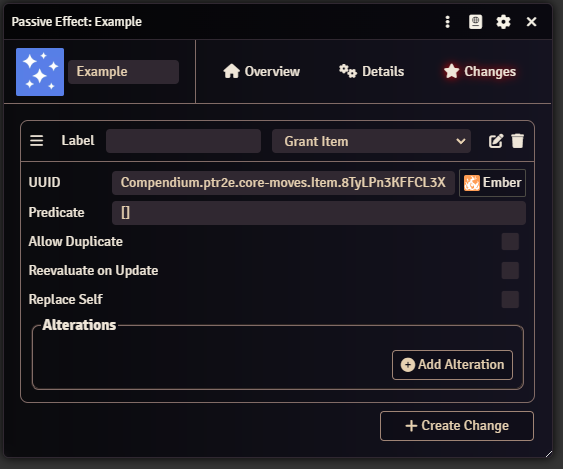
{
  "type": "grant-item",
  "value": "Compendium.ptr2e.core-moves.Item.8TyLPn3KFFCL3XMX",
  "predicate": [],
  "allowDuplicate": false,
  "reevaluateOnUpdate": false,
  "alterations": [],
  "replaceSelf": false,
}
¶ Grant Effect
Grant Effect works identical to Grant Item, except for instead of filling in the uuid, you can fill in the slug (lowercase name) of an affliction which is present in the right-click token menu. Such as 'burn'
¶ Example - Grant the Burn Affliction
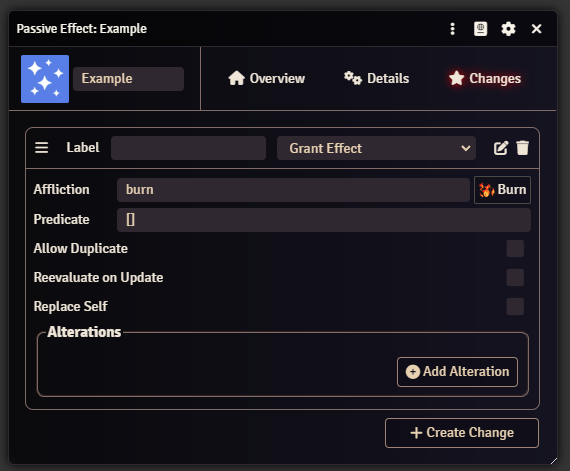
{
  "type": "grant-effect",
  "value": "burn",
  "predicate": [],
  "allowDuplicate": false,
  "reevaluateOnUpdate": false,
  "alterations": [],
  "replaceSelf": false,
}
¶ Add/Remove Trait
One of, if not the simplest Change Model, it does what it says on the tin.
¶ Properties
trait: The trait to apply/removepredicate
¶ Example - Add Trait 'Aura'
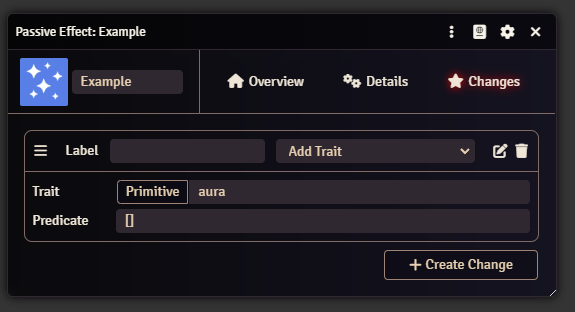
{
  "type": "add-trait",
  "value": "aura",
  "predicate": []
}
¶ Suppress Ability
Just as simple as the Add/Remove Trait Change, it disables an ability. This is useful for certain forme changes that may replace one ability with another, you would suppress the old Ability, and then grant the new Ability with an item alteration marking it free.
¶ Properties
slug: The slug of the ability to suppresspredicate
¶ Example - Suppress ability 'Torrent'
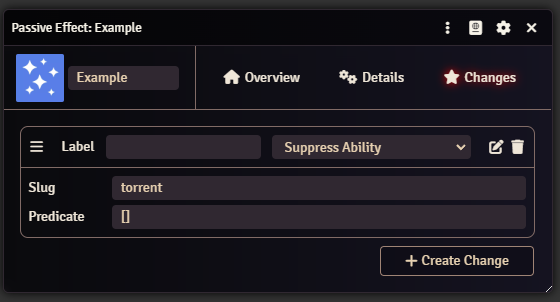
{
  "type": "suppress-ability",
  "key": "torrent",
  "predicate": []
}
¶ Stats Alteration
Stats alteration is a variation of AE-Like, that specificially applies the appropriate values with mode 'Add' to the base stats of the affected Actor, this is particularly useful for Forms such as Mega Evolution.
¶ Properties
hpatkdefspaspdspepredicate
¶ Example - Apply the stat changes of a Mega Abomasnow
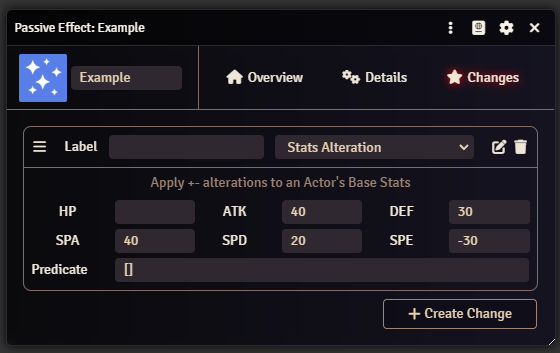
{
  "type": "stats-alteration",
  "predicate": [],
  "hp": null,
  "atk": 40,
  "def": 30,
  "spa": 40,
  "spd": 20,
  "spe": -30,
}
¶ Roll Note
Roll Notes are a way to add reminder text to actions in Chat, this can be useful to help set a reminder, for example if you keep forgetting the [Dash] trait of your attack.
¶ Properties
selectortext: The actual text you wish to be displayed in chat.predicate
¶ Roll Option
You may remember this from the terms section, Roll Options are used to define 'state' on an actor, such as having certain conditions, or whether they're above half health or not etc. Using this Change Model you can define custom 'states', this can be useful for example to denote when someone is in a certain weather, or if they have a Forme change, that they're in a different forme!
This Change Model is automatically used when making Forme Automation. Roll Options have different domains they can be part of, every roll option is always added to the all domain, and any other domain you may input. If a Roll Option is part of a different domain besides all, it'll be added to the all domain in the format of: {domain}:{option}.
¶ Properties
domain: by default 'all', generally shouldn't be changed unless applicable for specific effects.option: The kebab-case option to be set.toggleable: Checkbox - Default false, when true, will add a Checkbox Toggle to the Effects tab of an Actor, where you can easily turn this option on or off, this can be useful when another effect might predicate off of a certain state, such as being in Sunny Weather.countable: Checkbox - Default false, when true, will append the amount of effects that add this option to the end of the option likeweather:sunny:1. Cannot be enabled alongside 'toggleable'.predicate
¶ Example - Weather Sunny Toggle
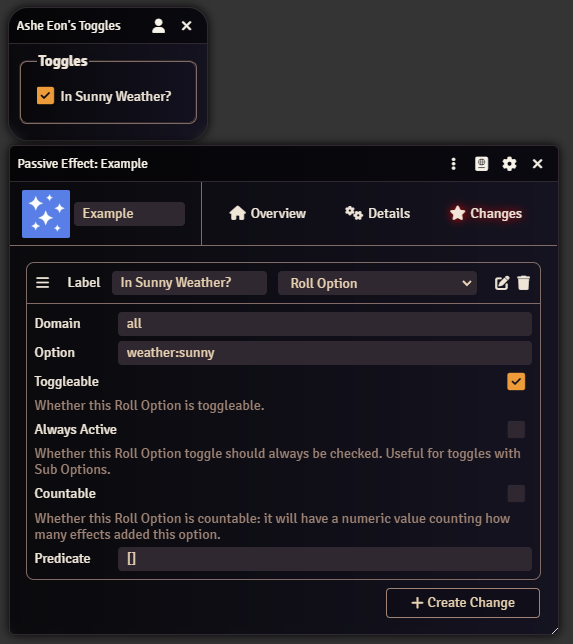
{
  "type": "roll-option",
  "value": "weather:sunny",
  "predicate": [],
  "domain": "all",
  "toggleable": true,
  "count": false,
  "alwaysActive": false,
  "label": "In Sunny Weather?"
}
¶ Roll Effect
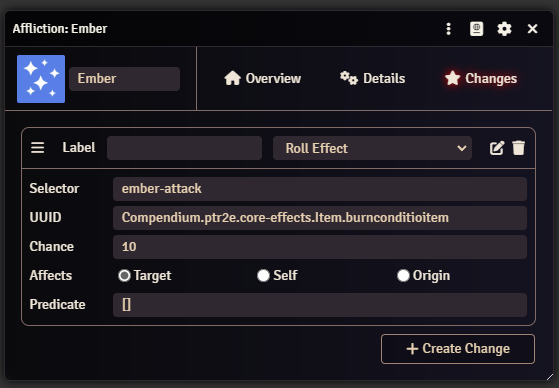
Roll Effects, also known as 'Rider Effects', are effects that are applied during attacks to either the target, or the origin of the effect. Think of effects such as Ember's 10% chance to Burn the target, or Ancient Power's 10% chance to gain an Omni Boost, but also abilities such as Poison Point which when someone hits the creature with Poison Point with a Contact move, they have a 30% chance to be poisoned!
¶ Properties
selectoruuid: The UUID of the Effect Item to apply. This must specificially be an Effect Item UUID, and not the UUID of the ActiveEffect mounted on the Effect Item!chance: The %Chance for this effect to trigger, for example 10% would be written as10. Roll Effects that target the same UUID & Selector will be combined, so the effect chance will stack.affectseitherTarget,SelforOrigin.Targetwill apply the effect to the target of the Attack,Selfwill apply the effect to the user of the Effect,Originis used for Defensive effects that should apply to someone that attacks you.predicate
¶ Example - Ember's 10% chance to Burn
{
  "type": "roll-effect",
  "key": "ember-attack",
  "value": "Compendium.ptr2e.core-effects.Item.burnconditioitem",
  "predicate": [],
  "chance": 10,
  "affects": "target",
}
¶ Add Clock
Clocks can be used in many ways, this CM allows you to create a clock (if it doesn't already exist).
Similarly, once the effect housing this change has been removed, the clock gets deleted.
¶ Properties
key: The Clock ID, the unique identifier for the clock, must be exactly 16 characters logn and only contain letters and numbers.max: The Max spokes of the clock.value: The starting value of the clock.color: Custom color for the clock.private: Whether the clock should only be visible to GMs or also to players.predicate
¶ Increment Clock
This CM can be used to increment a clock existing on the target of the effect.
Similarly to Grants, this change is directly applied on the Actor, deleting the effect after use (if it was the only change on this effect).
¶ Properties
id: The Clock ID, the unique identifier for the clock, must be exactly 16 characters logn and only contain letters and numbers.value: The amount to increment the clock bypredicate
¶ References & Option Details
TODO: Add this section
tl;dr use Data inspector to figure out selectors & options
¶ Special Affliction Options
TODO: Add this section
tl;dr explain how the damage field & other related options work.
¶ Predicates
TODO: Replace the below info from 1e and add a more detailed explanation.
If you want your bonus to only apply at certain times, you can define so using Predicates.
- Predicates are an array, which means they need to have
[]around them. You can seperate multiple items with,. Every entry in the array must be satisfied to enable the rule element.- Example: if you only want to affect enemy ghost types you'd predicate on
"predicate": ["target:trait:ghost"]
- Example: if you only want to affect enemy ghost types you'd predicate on
- Generally Predicates are built out of multiple statements of Roll Options.
- Think of each roll option as a statement about the state of the game, or the actor/item. While predicates are tests of those statements to determine if the effect should be active
- You can use any of the basic logical tests as part of a predicate:
and,or,nor,nand,not,lt(less than),lte(less than or equal to),gt(greater than),gte(greater than or equal to).
¶ API Documentation
This section will follow the documentation of each individual property, simple properties will have an in-line explanation, while complex properties will follow their definition below the JSON default data example, as well as their Type Script type definitions. For some examples, you can check the above Basic Change Models
You may notice that Foundry will add additional fields such as mode or priority. These fields may not be used by all Changes, but are still present as they are default fields that Foundry uses, this is to keep compatability with other modules that interact with Active Effects, if not mentioned in below documentation, those fields won't do anything for the applicable fields.
¶ Some standard fields
- The
typefield defines the type of the Change Model - The
labelfield is available for most Change Models that interact with the 'Modifier Dialog' that shows before a Roll is made - The
valuefield. For more details check Basic Change Models above - The
selectorfield. For more details check Basic Change Models above - The
predicatefield is for Predicate selectors, see the predicate section above
¶ Change Model default field definitions
A foundry schema field's type is always defined as Field<SourceProp, ModelProp, Required, Nullable, HasInitial>.
SourcePropis the type of the data stored in the Foundry DatabaseModelPropis the type of the data when loaded into the Foundry WorldRequiredwhether a value is required, or can beundefined.Nullablewhether a value can benull.HasInitialwhether this has a default value or not.
Source Definition
interface ChangeSchema extends foundry.data.fields.DataSchema {
  // Core Foundry Fields
  /** Key Field, different functionality for each Change Model */
  key: foundry.data.fields.StringField<string, string, true, false, true>
  /** Value Field, different functionality for each Change Model */
  value: ResolvableValueField<true, false, true>
  /** AE Application Mode, valid values are 0-5. See `CONST.ACTIVE_EFFECT_MODES` */
  mode: foundry.data.fields.NumberField<ActiveEffectChangeMode, ActiveEffectChangeMode, false, false, true>
  /** Unused Field */
  priority: foundry.data.fields.NumberField;

  // Custom Fields
  /** The Type field, defining which type of change model this is. */
  type: foundry.data.fields.StringField<string, string, true, false, true>;

  /** Label field used for most modifier related Changes */
  label: foundry.data.fields.StringField<string, string, false, false, true>;
  /** @See[Predicate] */
  predicate: PredicateField;
  /** Whether this effect failed its predication or otherwise should be disabled. */
  ignored: foundry.data.fields.BooleanField;
};
¶ AE-Like
Apply modification to Data Path similar to Foundry's core ActiveEffect Framework.
{
  "type": "basic",
  "key": "", // The `path` field, dot seperated foundry data path for which value to manipulate
  "value": 0, // Resolvable Value, to apply to the above path
  "mode": 2, // The mode in which to apply the effect, most common being: 1 Multiply, 2 Add and 5 Override.
  "predicate": []
}
¶ Flat Modifier
Flat Modifiers are modifiers that apply only to specific rolls based on their selector, generally speaking a selector for Flat Modifiers is made up of 3 parts. The first part, is the basic selector as found in a Roll's Data Inspector, the second part is the 'Modifier Type' suffix such as 'accuracy', 'crit' or 'damage', which determines what about the roll is modified. The third part meanwhile is the 'Method Suffix', similar to the 'mode' property of the AE-Like selector, this says how the modifier should be applied, the values are 'percentile', 'stage' and 'flat'. An example is attack-accuracy-stage.
The following Modifier Type Suffixes are available:
accuracyreferrs to the Accuracy portion of the Attack Calculationevasionreferrs to the Evasion portion of the Attack Calculationcritreferrs to the Crit portion of the Attack Calculationdamagereferrs to the Damage portion of the Damage Calculationpowerreferrs to the Power portion of the Damage Calculationstatis used for modifying which stat is used to calculate the 'attacking/defending stat' portion of the Damage Calculationeffectivenessis used for modifying the effectiveness portion of the Damage Calculationcaptureis used for modifying Capture chances of Capture Rolls.
The following Method Suffixes are available:
percentileapplies as a multiplier, generally after the 'Flat' and 'Stage' modifiers are applied. Percentiles should be written full out, for example, a 10% increase would have its value written as10, a 150% decrease similarly would be written out as-150.stagecan be used to modify the stages used in the appropriate calculation, an example use here is for the 'Range Increment Penalty' the system applies.flatas the name directly adds the appropriate value as a 'flat value'.
{
  "type": "flat-modifier",
  "key": "", // the `selector` field.
  "value": 0, // Resolvable Value
  "predicate": [],
  "hideIfDisabled": false // By default, if the predicate resolves to 'false', the modifier will still show in the Modifier Dialog pop-up so it can be manually toggled on, if this is set to true, and the predicate resolves to 'false', it will not be displayed in the dialog at all.
}
Source Definition
interface FlatModifierSchema extends ChangeSchema {
  hideIfDisabled: foundry.data.fields.BooleanField<boolean, boolean, true, false, true>
}
¶ Stage Modifier
Resolves as a Flat Modifier with the value of the selector (key) field appended with -stage.
{
  "type": "stage-modifier",
  "key": "", // the `selector` field.
  "value": 0, // Resolvable Value
  "predicate": [],
  "hideIfDisabled": false // By default, if the predicate resolves to 'false', the modifier will still show in the Modifier Dialog pop-up so it can be manually toggled on, if this is set to true, and the predicate resolves to 'false', it will not be displayed in the dialog at all.
}
¶ Percentile Modifier
Resolves as a Flat Modifier with the value of the selector (key) field appended with -percentile.
{
  "type": "percentile-modifier",
  "key": "", // the `selector` field.
  "value": 0, // Resolvable Value
  "predicate": [],
  "hideIfDisabled": false // By default, if the predicate resolves to 'false', the modifier will still show in the Modifier Dialog pop-up so it can be manually toggled on, if this is set to true, and the predicate resolves to 'false', it will not be displayed in the dialog at all.
}
¶ Ephemeral Modifier
Resolves as a Flat Modifier, except for instead of applying to your own Rolls, it applies to any Roll targeting you.
{
  "type": "ephemeral-modifier",
  "key": "", // the `selector` field.
  "value": 0, // Resolvable Value
  "predicate": [],
  "hideIfDisabled": false // By default, if the predicate resolves to 'false', the modifier will still show in the Modifier Dialog pop-up so it can be manually toggled on, if this is set to true, and the predicate resolves to 'false', it will not be displayed in the dialog at all.
}
¶ Grant Item
Grant Item can be used to, whenever this effect is applied, give the Actor another item.
If reevaluateOnUpdate is enabled, whenever the Actor holding the item/effect is updated, the Predicate will be re-checked to see if the item should be applied. A Predicate must be set when this option is enabled.
You can apply Alterations to a Grant, these are similar to AE-Likes applied permanently and directly to the Item's Data before it is granted to the Actor.
You can define onDeleteActions to define what should happen if either the source Item/Effect or the granted Item/Effect is deleted.
detach means to do nothing. cascade means if this is deleted, also delete the other Item/Effect. restrict means the other Item/Effect cannot be deleted as long as this one exists.
{
  "type": "grant-item",
  "value": "", // The `uuid` field.
  "predicate": [],
  "reevaluateOnUpdate": false, // Whether to re-evaluate the predicate whenever the Actor holding this effect updates. A Predicate must be set if this is true.
  "inMemoryOnly": false, // Unfinished Feature: Please Ignore
  "allowDuplicate": true, // Whether or not to allow duplicate copies, or if the grant should fail if the item already exists.
  "alterations": [ // An Array of Alterations to apply to the Item before it is Granted
  	{
      "mode": 2, // AE-Like `mode` property
      "property": "", // AE-Like `path` property
      "value": 0 // Resolvable Value
    }
  ],
  "track": false, // Unfinished Feature: Please Ignore
  "replaceSelf": false, // Whether to replace the Item/Effect holding this grant with the item Granted, or to apply both to the Actor.
  "onDeleteActions": { // What to do if either this (granter) or the granted item (grantee) is deleted.
    "grantee": "detach", // Default Detach
    "granter": "cascade" // Default Cascade - Delete granted item if the granter is deleted.
  }
}
Source Definition
interface GrantItemSchema extends ChangeSchema {
  // /** The UUID of the item to grant: must be a compendium or world item */
  // value: StringField<string, string, true, false, false>;
  // /** A flag for referencing the granted item ID in other rule elements */
  // key: StringField<string,string,true,true,true>
  /** Permit this grant to be applied during an actor update--if it isn't already granted and the predicate passes */
  reevaluateOnUpdate: BooleanField<boolean, boolean, false, false, true>;
  /** Instead of creating a new item in the actor's embedded collection, add a "virtual" one. Usable only with conditions */
  inMemoryOnly: BooleanField<boolean, boolean, false, false, true>;
  /** Allow multiple of the same item (as determined by source ID) to be granted */
  allowDuplicate: BooleanField<boolean, boolean, false, false, true>;
  /** A list of alterations to make on the item before granting it */
  alterations: ArrayField<EmbeddedDataField<ItemAlteration>>;
  /**
   * Track a granted physical item from roll options: the sluggified `flag` will serve as a prefix for item roll
   * options, which are added to the `all` domain.
   */
  track: BooleanField<boolean, boolean, false, false, false>;
  /** Replace the granting item with the granted item*/
  replaceSelf: BooleanField<boolean, boolean, false, false, false>;
};
ItemAlteration Source Definition
interface ItemAlterationSchema extends foundry.data.fields.DataSchema {
  /** AE Application Mode, valid values are 0-5. See `CONST.ACTIVE_EFFECT_MODES` */
  mode: foundry.data.fields.NumberField<ActiveEffectChangeMode, ActiveEffectChangeMode, false, false, true>
  /** AE-Like `path` field. */
  property: StringField<string, string, true, false, true>;
  /** AE-Like `value` field. */
  value: ResolvableValueField<true, false, true>;
}
¶ Grant Effect
Resolves as a Grant Item, except for instead of an UUID it takes the slug of an affliction present in the right-click Token HUD.
{
  "type": "grant-effect",
  "value": "", // The slug of the affliction to apply.
  "predicate": [],
  "reevaluateOnUpdate": false, // Whether to re-evaluate the predicate whenever the Actor holding this effect updates. A Predicate must be set if this is true.
  "inMemoryOnly": false, // Unfinished Feature: Please Ignore
  "allowDuplicate": true, // Whether or not to allow duplicate copies, or if the grant should fail if the item already exists.
  "alterations": [ // An Array of Alterations to apply to the Item before it is Granted
  	{
      "mode": 2, // AE-Like `mode` property
      "property": "", // AE-Like `path` property
      "value": 0 // Resolvable Value
    }
  ],
  "track": false, // Unfinished Feature: Please Ignore
  "replaceSelf": false, // Whether to replace the Item/Effect holding this grant with the item Granted, or to apply both to the Actor.
  "onDeleteActions": { // What to do if either this (granter) or the granted item (grantee) is deleted. `detach` means to do nothing. `cascade` means if this is deleted, also delete the other item. `restrict` means the other item cannot be deleted as long as this one exists.
    "grantee": "detach", // Default Detach
    "granter": "cascade" // Default Cascade - Delete granted item if the granter is deleted.
  }
}```

## Add Trait
Adds a virtual trait to an Actor/Item

```json
{
  "type": "add-trait",
  "value": "", // Slug of the trait to add
  "predicate": [],
}
¶ Remove Trait
Removes a trait from an Actor/Item
{
  "type": "remove-trait",
  "value": "", // Slug of the trait to remove
  "predicate": [],
}
¶ Suppress Ability
Disable an Ability on an Actor, this is useful for certain forme changes that may replace one ability with another, you would suppress the old Ability, and then grant the new Ability with an item alteration marking it free.
{
  "type": "suppress-ability",
  "key": "", // Slug of the ability to suppress
  "predicate": [],
}
¶ Stats Alteration
A shortcut for effectively applying 6 AE-Likes pointing at the base-stats of an Actor, with mode set to 'Add'. Useful for things like Mega Evolution forme effects.
{
  "type": "suppress-ability",
  "predicate": [],
  "hp": null, // Null or Number
  "atk": null, // Null or Number
  "def": null, // Null or Number
  "spa": null, // Null or Number
  "spd": null, // Null or Number
  "spe": null // Null or Number
}
¶ Roll Notes
Roll Notes are a way to add reminder text to actions in Chat.
{
  "type": "roll-note",
  "key": "", // The `selector` field.
  "value": "", // The `text` field.
  "predicate": [],
  "visibility": null // Unfinished Feature: Please Ignore
}
¶ Roll Option
Roll Options are used to define 'state' on an actor, such as having certain conditions, or whether they're above half health or not etc. Using this Change Model you can define custom 'states'.
This Change Model is automatically used when making Forme Automation.
Roll Options have different domains they can be part of, every roll option is always added to the all domain, and any other domain you may input.
If a Roll Option is part of a different domain besides all, it'll be added to the all domain in the format of: {domain}:{option}.
{
  "type": "roll-option",
  "value": "", // The `option` field.
  "predicate": [],
  "domain": "all",
  "suboptions": [
    {
  		"label": "", // The label shown on the Toggles Section of the Actor Sheet
      "value": "", // The value appended to the option string
      "predicate": [], // Predicated for whether this option should be shown
      "selected": false // Value tracking which option is selected, set one to true if you wish for a default selected option, otherwise the first in the list will be defaulted.
    }
  ], // Suboptions for a toggle, appended to the option string
  "state": true, // The value of the roll option: either a boolean or a string resolves to a boolean If omitted, it defaults to `true` unless also `togglable`, in which case to `false`.
  "toggleable": false, // Whether the roll option is toggleable: a checkbox will appear in interfaces (usually actor sheets)
  "disabledIf": [], // Default undefined, an optional predicate to determine whether the toggle is interactable by the user
  "disabledValue": null, // Default undefined, the value of the roll option if its toggle is disabled: null indicates the pre-disabled value is preserved
  "alwaysActive": false, // Whether this (toggleable and suboptions-containing) roll option always has a `value` of `true`, allowing only suboptions to be changed
  "count": false // Whether this roll option is countable: it will have a numeric value counting how many rules added this option
}
Source Definition
interface RollOptionSchema extends ChangeSchema {
  domain: foundry.data.fields.StringField<keyof typeof RollOptionDomains, keyof typeof RollOptionDomains, true, false, true>;

  /** Suboptions for a toggle, appended to the option string */
  suboptions: foundry.data.fields.ArrayField<
    foundry.data.fields.SchemaField<
      SuboptionData,
      SourceFromSchema<SuboptionData>,
      ModelPropsFromSchema<SuboptionData>,
      true,
      false,
      true
    >
  >;
  /**
  * The value of the roll option: either a boolean or a string resolves to a boolean If omitted, it defaults to
  * `true` unless also `togglable`, in which case to `false`.
  */
  state: ResolvableValueField<false, false, true>;
  /** Whether the roll option is toggleable: a checkbox will appear in interfaces (usually actor sheets) */
  toggleable: foundry.data.fields.BooleanField<boolean, boolean, false, false, false>;
  /** If toggleable, the location to be found in an interface */
  placement: foundry.data.fields.StringField<string, string, false, false, false>;
  /** An optional predicate to determine whether the toggle is interactable by the user */
  disabledIf: PredicateField<false, false, false>;
  /** The value of the roll option if its toggle is disabled: null indicates the pre-disabled value is preserved */
  disabledValue: foundry.data.fields.BooleanField<boolean, boolean, false, false, false>;
  /**
  * Whether this (toggleable and suboptions-containing) roll option always has a `value` of `true`, allowing only
  * suboptions to be changed
  */
  alwaysActive: foundry.data.fields.BooleanField<boolean, boolean, false, false, false>;
  /** Whether this roll option is countable: it will have a numeric value counting how many rules added this option */
  count: foundry.data.fields.BooleanField<boolean, boolean, false, false, false>;
}

interface SuboptionData extends foundry.data.fields.DataSchema {
  label: foundry.data.fields.StringField<string, string, true, false, false>;
  value: foundry.data.fields.StringField<string, string, true, false, false>;
  predicate: PredicateField;
  selected: foundry.data.fields.BooleanField<boolean, boolean, true, false, true>;
}
¶ Roll Effect
Roll Effects, also known as 'Rider Effects', are effects that are applied during attacks to either the target, or the origin of the effect. Think of effects such as Ember's 10% chance to Burn the target, or Ancient Power's 10% chance to gain an Omni Boost, but also abilities such as Poison Point which when someone hits the creature with Poison Point with a Contact move, they have a 30% chance to be poisoned!
You can boost the overall chance of an actor to succeed at Roll Effects by modifying system.modifiers.effectChance.
The roll-option special:serene-grace will automatically double all (final) effect chances.
You can use the -effect-chance selector suffix to increase the effect chance of a specific effect, but only if the applicable attack already has a chance to apply this effect, otherwise it is ignored. This is useful for an effect that "Increases the chance for an Attack that has a secondary chance to Burn by 20%" to only apply to effects that already have a burn chance, you would use the UUID of the burn condition and selector attack-effect-chance.
{
  "type": "roll-effect",
  "key": "", // The `selector` field.
  "value": "", // the `uuid` field.
  "predicate": [],
  "chance": 10, // The %Chance for this effect to trigger, for example 10% would be written as `10`. Roll Effects that target the same UUID & Selector will have their chances added up and combined into one Roll Effect.
  "affects": "target" // either `Target`, `Self` or `Origin`. `Target` will apply the effect to the target of the Attack, `Self` will apply the effect to the user of the Effect, `Origin` is used for Defensive effects that should apply to someone that attacks *you*.
}
Source Definition
interface EffectRollSchema extends ChangeSchema {
  chance: foundry.data.fields.NumberField<number, number, true, false, true>;
  affects: foundry.data.fields.StringField<"self" | "target" | "origin", "self" | "target" | "origin", true, false, true>;
}
¶ Choice Set
Choice Sets are highly flexible and can be used to prompt users to make a choice from a list of options. This choice is then stored as a flag on the actor, which can then be referenced by other rule elements using the data path flags.ptr2e.rulesSelections.[flag]
{
  "type": "choice-set",
  "key": "",
  "value": 0,
  "predicate": [],
  "mode": 2,
  "priority": null,
  "ignored": false,
  "choices": [ // The options from which the user can choose. If a string is provided, it is treated as a reference to a record in `CONFIG.PTR2E`, or as a data path on the Actor, and the  `PromptChoice` array is composed from its entries.
  	{
  		"value": "some-uuid", // If all choice-set items exclusively contain a value with a UUID (and optional predicate), the label and image will be loaded from the item referenced.
  	},
  	{
  		"value": "", // The value which whill be set on the flag
  		"label": "", // The display text for the option button
  		"img": undefined, // Optional image to show in the option button
  		"predicate": undefined, // Optional Predicate, will only show this option if the predicate is met.
  	}
  ],
  "prompt": "PTR2E.ChoiceSetPrompt.Prompt", // The prompt to present in the ChoiceSet application window
  "adjustName": true, // Whether the parent item's name should be adjusted to reflect the choice made
  "flag": undefined, // The name of the flag that will contain the user's selection. If not set, it defaults to the camel-casing of the parent item's slug, falling back to name.
  "rollOption": null, // An optional roll option to be set from the selection
  "allowedDrops": undefined, // Unfinished Feature: Please Ignore
  "allowNoSelection": undefined, // Allow the user to make no selection without suppressing all other rule elements on the parent item
}
Source Definition
interface ChoiceSetSchema extends ChangeSchema {
  /**
   * The options from which the user can choose. If a string is provided, it is treated as a reference to a record in
   * `CONFIG.PTR2E`, and the `PromptChoice` array is composed from its entries.
   */
  choices: DataUnionField<
    | StrictArrayField<StrictObjectField<PickableThing>, PickableThing[], PickableThing[], true, false, false>
    | StrictStringField<string, string, true, false, false>,
    true,
    false,
    true
  >;
  /** The prompt to present in the ChoiceSet application window */
  prompt: foundry.data.fields.StringField<string, string, false, false, true>;
  /** Whether the parent item's name should be adjusted to reflect the choice made */
  adjustName: DataUnionField<
    StrictBooleanField<true, false, false> | StrictStringField<string, string, true, false, false>,
    true,
    false,
    true
  >;
  /**
   * The name of the flag that will contain the user's selection. If not set, it defaults to the camel-casing of the
   * parent item's slug, falling back to name.
   */
  flag: foundry.data.fields.StringField<string, string, false, false, false>;
  /** An optional roll option to be set from the selection */
  rollOption: foundry.data.fields.StringField<string, string, false, true, true>;
  /** A predicate indicating valid dropped item selections */
  allowedDrops: foundry.data.fields.SchemaField<
    AllowedDropsSchema,
    SourceFromSchema<AllowedDropsSchema>,
    ModelPropsFromSchema<AllowedDropsSchema>,
    false,
    true,
    false
  >;
  /** Allow the user to make no selection without suppressing all other rule elements on the parent item */
  allowNoSelection: StrictBooleanField<false, false, false>;
  selection: foundry.data.fields.AnyField;
}

interface PickableThing<T extends string | number | object = string | number | object> {
  value: T;
  label: string;
  img?: string;
  predicate?: Predicate;
}
¶ Alter Attack
Alter Attack can be used to modify certain details of an attack before it is made, in a similar style as to how an AE Like functions, except for triggered with the timing of a Flat Modifier.
The following properties are available:
poweraccuracytypetraitspp-costrangerip(Range Increment Penalty)offensiveStatdefensiveStat
{
  "type": "alter-attack",
  "key": "", // Selector field similar to how a Flat Modifier would target an attack
  "value": "", // The value to apply
  "predicate": [], // Predicate for when this alteration may be attempted, this is based on the Actor's state.
  "mode": 2, // AE Application Mode, valid values are 0-5. See `CONST.ACTIVE_EFFECT_MODES`
  "property": "traits", // Property field as described above.
  "definition": [] // Predicate for if this *specific* attack should be altered.
}
Example of the Scrappy Ability Changes:
{
  "type": "alter-attack",
  "key": "normal-attack",
  "value": "ignore-type-immunity",
  "predicate": [],
  "mode": 2,
  "priority": null,
  "ignored": false,
  "property": "traits",
  "definition": [
  	"target:trait:ghost"
  ]
},
{
  "type": "alter-attack",
  "key": "fighting-attack",
  "value": "ignore-type-immunity",
  "predicate": [],
  "mode": 2,
  "priority": null,
  "ignored": false,
  "property": "traits",
  "definition": [
  	"target:trait:ghost"
  ]
}
Source Definition
interface AlterAttackChangeSchema extends ChangeSchema {
  property: foundry.data.fields.StringField<AttackPropertyOptions, AttackPropertyOptions, true, false, true>;
  definition: PredicateField;
};
¶ Aura
Auras as it says on the tin, allows you to create auras around an actor, which apply a specified effect to all the relevant targets within range.
{
  "type": "aura",
  "predicate": [],
  "radius": 5, // The radius of the aura in meters, or a string that resolves to one.
  "effects": [ // References to effects included in this aura
    {
      "uuid": "", // UUID of the to-apply Effect Item UUID
      "affects": "all", // `all`, `allies` or `enemies`.
      "events": [ // Currently only `enter` is implemented.
        "enter"
      ],
      "removeOnExit": true, // Whether to remove the effect from an actor immediately after its token exits the area
      "includesSelf": false, // Whether the effect is applied to the actor emitting the aura
      "appliesSelfOnly": false, // Whether the effect should only apply to the actor emitting the aura, setting a flag with the amount of tokens currently within the Aura, to automate effects like "Gain X per valid target in Aura."
      "predicate": [] // A predicating limiting whether the effect is transmitted to an actor
    }
  ],
  "appearance": { // Custom border, highlight, and texture for the aura: if omitted, the border color will be black, the fill color the user's configured color, and no texture.
    "border": { // Configuration of the border's color and alpha
      "color": "#c94dcb",
      "alpha": 0.75
    },
    "highlight": { // Configuration of the highlight's color and alpha
      "color": "user-color",
      "alpha": 0.25
    },
    "texture": null // Configuration for a texture (image or video) drawn as part of the aura
  },
  "mergeExisting": true // If another aura with the same slug is already being emitted, merge this aura's data in with the other's, combining effects as well as merging `colors` data.
}
Source Definition
interface AuraChangeSystemSchema extends ChangeSchema {
  /** The radius of the aura in meters, or a string that resolves to one. */
  radius: ResolvableValueField<true, false, true>;
  /** References to effects included in this aura */
  effects: StrictArrayField<
    foundry.data.fields.SchemaField<AuraEffectSchema>,
    SourceFromSchema<AuraEffectSchema>[],
    ModelPropsFromSchema<AuraEffectSchema>[],
    true,
    false,
    true
  >;
  /**
   * Custom border, highlight, and texture for the aura: if omitted, the border color will be black, the fill
   * color the user's configured color, and no texture.
   */
  appearance: foundry.data.fields.SchemaField<
    AuraAppearanceSchema,
    SourceFromSchema<AuraAppearanceSchema>,
    ModelPropsFromSchema<AuraAppearanceSchema>,
    true,
    false,
    true
  >;
  /**
   * If another aura with the same slug is already being emitted, merge this aura's data in with the other's,
   * combining effects as well as merging `colors` data.
   */
  mergeExisting: foundry.data.fields.BooleanField<boolean, boolean, true, false, true>;
}

interface AuraEffectSchema extends foundry.data.fields.DataSchema {
  uuid: StrictStringField<string, string, true, false, false>;
  affects: StrictStringField<"allies" | "enemies" | "all", "allies" | "enemies" | "all", true, false, true>;
  appliesSelfOnly: StrictBooleanField<true, false, true>;
  events: foundry.data.fields.ArrayField<
    StrictStringField<"enter" | "turn-start" | "turn-end", "enter" | "turn-start" | "turn-end", true, false, false>,
    ("enter" | "turn-start" | "turn-end")[],
    ("enter" | "turn-start" | "turn-end")[],
    true,
    false,
    true
  >;
  /** A predicating limiting whether the effect is transmitted to an actor */
  predicate: PredicateField<false, false, true>;
  /** Whether to remove the effect from an actor immediately after its token exits the area */
  removeOnExit: StrictBooleanField<true, false, true>;
  /** Whether the effect is applied to the actor emitting the aura */
  includesSelf: StrictBooleanField<false, false, true>;
  /** An array of alterations to apply to the effect before transmitting it */
  // alterations: StrictArrayField<EmbeddedDataField<ItemAlteration>>;
};

interface AuraAppearanceSchema extends foundry.data.fields.DataSchema {
  /** Configuration of the border's color and alpha */
  border: foundry.data.fields.SchemaField<
    {
      color: DataUnionField<
        StrictStringField<"user-color", "user-color", true, false, false> | foundry.data.fields.ColorField<true, false, false>,
        true,
        false,
        true
      >;
      alpha: foundry.data.fields.AlphaField<true, false, true>;
    },
    { color: "user-color" | HexColorString; alpha: number },
    { color: "user-color" | Color; alpha: number },
    false,
    true,
    true
  >;
  /** Configuration of the highlight's color and alpha */
  highlight: foundry.data.fields.SchemaField<
    {
      color: DataUnionField<
        StrictStringField<"user-color", "user-color", true, false, false> | foundry.data.fields.ColorField<true, false, false>,
        true,
        false,
        true
      >;
      alpha: foundry.data.fields.AlphaField<false, false, true>;
    },
    { color: "user-color" | HexColorString; alpha: number },
    { color: "user-color" | Color; alpha: number },
    false,
    false,
    true
  >;
  /** Configuration for a texture (image or video) drawn as part of the aura */
  texture: foundry.data.fields.SchemaField<
    AuraTextureSchema,
    SourceFromSchema<AuraTextureSchema>,
    ModelPropsFromSchema<AuraTextureSchema>,
    false,
    true,
    true
  >;
}

interface AuraTextureSchema extends foundry.data.fields.DataSchema {
  /** The path to the texture file: can be injected */
  src: StrictStringField<string, string, true, false, false>;
  alpha: foundry.data.fields.AlphaField<true, false, true>;
  /** A manual rescaling of the texture resource */
  scale: StrictNumberField<number, number, true, false, true>;
  /** A manual x/y translation of the texture resource */
  translation: foundry.data.fields.SchemaField<
    xyPairSchema,
    SourceFromSchema<xyPairSchema>,
    ModelPropsFromSchema<xyPairSchema>,
    false,
    true,
    true
  >;
  /** If the `src` is a video, whether to loop it */
  loop: StrictBooleanField<false, false, true>;
  /** If the `src` is a video, the playback rate of resulting `HTMLVideoElement` */
  playbackRate: StrictNumberField<number, number, false, false, true>;
};

interface xyPairSchema extends foundry.data.fields.DataSchema {
  x: StrictNumberField<number, number, true, false, false>;
  y: StrictNumberField<number, number, true, false, false>;
}
¶ Token Tag
The Token Tag is a simple but powerful Change that allows you to Tag a token to a certain effect, which then allows other Changes to predicate on that fact. This is useful for effects such as Duel or Seeded.
{
    "type": "token-tag",
  "key": "" // The slug other change models can predicate off of.
}
¶ Token Alteration
Token Alterations are simply any changes to an Actor's token caused by an Effect, whether that is to do with the size, the image, its lighting or otherwise.
{
  "type": "token-alterations",
  "predicate": [],
  "texture": null, // File Path to image to apply to token
  "tint": null, // Tint Color to Apply to Token
  "scale": null, // Token Scale
  "name": null, // Token Name
  "light": null, // Token Light
  "alpha": null // Alpha value of the Token
}
¶ Ephemeral Effect
The EphemeralEffect change allows you to place temporary effects that apply only during some calculation. This Change was used in early-stages of the Alpha of 2e, but mostly goes unused as there are easier Changes to use that achieve the same goal. This may be removed in future versions if no use-case is detected.
{
  "type": "ephemeral-effect",
  "key": "", // Selector for when to apply this effect
  "value": "", // UUID of the Effect Item to apply
  "predicate": [],
  "affects": "target" // Either `target`, `self` or `origin`.
}
Source Definition
interface EphemeralEffectSchema extends ChangeSchema {
  affects: foundry.data.fields.StringField<"self" | "target" | "origin", "self" | "target" | "origin", true, false, true>;
}